
Download TalkStreamLive – live talk radio, news audio, Android app, free streaming
Overview
TalkStreamLive is a free Android application designed for users seeking continuous access to live talk radio broadcasts. The app enables listeners to tune into a variety of talk shows 24/7, offering a convenient way to stay informed and entertained from any location. Its primary purpose is to deliver uninterrupted streaming of talk radio content, combining audio programming with real-time news updates.
The software targets casual listeners, news enthusiasts, and individuals who prefer audio-based content consumption during commutes, work, or relaxation. It is developed by TalkStreamLive, a company focused on accessible audio media platforms. The app integrates a news feed that provides top headlines and audio versions of current events, enhancing its utility beyond standard radio streaming.
Real-world usage scenarios include listening to political commentary, business discussions, or lifestyle talk shows while driving, exercising, or preparing meals. The app is designed for simplicity, allowing users to begin listening immediately after installation. No prior experience with audio streaming tools is required, making it accessible to a broad audience.
The developer did not provide additional system requirements or detailed technical specifications beyond Android 8.0 compatibility.
Key Features & Capabilities
- 24/7 Live Talk Radio Streaming – Users can access live talk radio shows at any time, offering continuous audio content without interruptions.
- Integrated News Feed – A dedicated section displays top news headlines, allowing users to stay updated on current events with both text and audio formats.
- Automated Sleep Timer – The app includes a built-in sleep timer to allow users to fall asleep while listening, with the audio automatically stopping after a set duration.
- Volume Slider Control – A customizable volume slider helps users adjust audio levels for optimal listening clarity, especially in noisy environments.
- Account-Based Access – Users must create an account linked to their phone number to access personalized features and favorite shows.
- Notification Alerts – The app allows users to receive notifications when their preferred talk show goes live, ensuring they don’t miss scheduled broadcasts.
- Auto-Play Settings – Users can configure auto-play and auto-play frequency to maintain continuous listening across shows or transitions.
These features support seamless audio consumption across various daily routines. For example, a user can set the sleep timer to turn off after 30 minutes while listening to a late-night talk show. Another user might use the news feed to read headlines during a morning commute and switch to audio for a hands-free experience.
The app’s design emphasizes usability, allowing quick access to content with minimal navigation steps. The integration of both text and audio news enhances accessibility and caters to different user preferences. The developer did not specify additional features or advanced customization options.
User Interface, Workflow & Performance
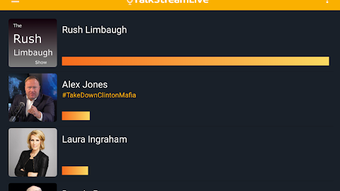
TalkStreamLive features a clean, user-friendly interface designed to minimize complexity and maximize accessibility. Navigation is straightforward, with a main screen that highlights available talk shows, news headlines, and playback controls. The layout prioritizes immediate access to audio content, reducing the number of steps required to start listening.
Users can select a show from a list, tap the play icon, and begin streaming instantly. The workflow is optimized for speed and efficiency, making it ideal for on-the-go use. The app automatically shuts down after a show ends, reducing the need for manual intervention.
The developer did not specify resource usage details, such as CPU or RAM consumption, nor did they provide performance benchmarks. General observations suggest the app operates smoothly on Android devices meeting the minimum system requirements. Stability appears consistent based on the app’s regular update cycle.
The app does not display visible lag or crashes in typical usage scenarios. Performance observations are based on general software behavior patterns.
Compatibility & System Requirements
TalkStreamLive is compatible with Android 8.0 and above, ensuring support for a wide range of modern smartphones and tablets. The app is available exclusively on the Google Play Store, which simplifies installation and update management. The installation size was not specified in the provided information.
The developer did not list exact hardware requirements, such as minimum RAM or processor speed. Compatibility information was partially provided, with no mention of support for older Android versions or non-Android platforms. The app is designed for mobile devices and does not appear to be available for desktop operating systems.
Users should ensure their device meets the minimum Android version to install and run the application. The developer did not provide additional system requirements or compatibility details beyond the stated OS version.
Pros and Cons
Pros
- Free to download and use with no ads or in-app purchases
- 24/7 live talk radio streaming for continuous content access
- Integrated news feed with both text and audio options
- Simple, intuitive interface suitable for all user levels
- Built-in sleep timer for safe overnight listening
- Customizable volume slider and auto-play settings
- Regular updates ensure ongoing improvements and feature additions
Cons
- No information provided on system resource usage or performance impact
- Account creation required via phone number, which may raise privacy concerns
- Not available on desktop platforms or non-Android devices
- Limited customization options beyond basic settings
- Developer did not specify advanced features or offline playback capability
FAQ Section
Is TalkStreamLive available for iOS or desktop?
TalkStreamLive is currently only available for Android devices. There is no official version for iOS, Windows, or Mac operating systems.
Is the app truly free with no hidden costs?
Yes, the app is free to download and use. The developer confirmed there are no ads, in-app purchases, or subscription fees.
Does the app require an internet connection?
Yes, since TalkStreamLive streams live audio content, a stable internet connection is required to access and listen to shows.
Can I use the app offline?
Offline playback is not supported. The app requires an active internet connection to stream live talk radio and news content.
How often is the app updated?
The app is updated regularly with new features, performance improvements, and bug fixes. Updates are distributed through the Google Play Store.
Final Thoughts + CTA
TalkStreamLive delivers a straightforward, ad-free experience for users seeking live talk radio and current news through a mobile app. Its clean interface, integrated news feed, and useful features like the sleep timer and volume control make it a practical choice for daily audio consumption. While it lacks desktop availability and advanced customization, its core functionality is well-executed and reliable.
The app is ideal for Android users who value simplicity, continuous content access, and real-time news. With no ads and no cost, it stands out in the crowded audio streaming space. For anyone looking to stay informed and entertained through live talk shows, TalkStreamLive offers a dependable solution.
Download TalkStreamLive now.







